What Are NFC Tags and How They Activate a Tracking Device
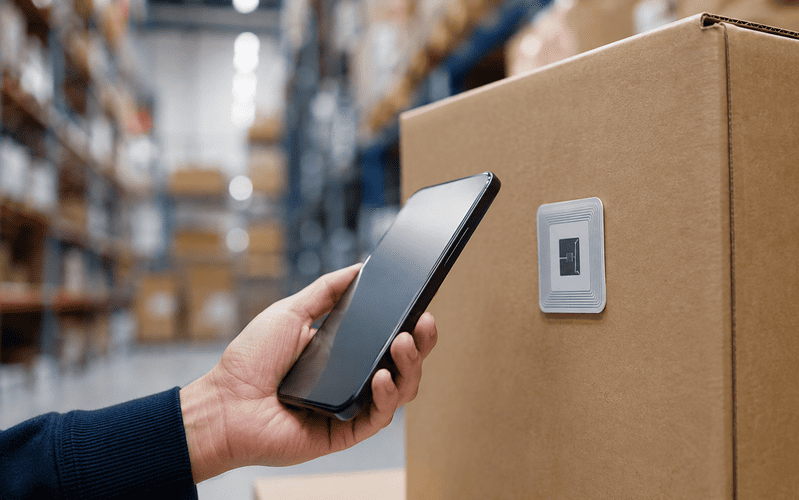
When someone pays with their phone in a store, without touching the card reader, they’re using the same technology that makes it possible to activate a tracking tag with a simple gesture. It’s called NFC, and although it’s mostly associated with payments, it has a much wider range of uses than it seems.
What is an NFC tag
An NFC tag (Near Field Communication) is a small chip with an integrated antenna, capable of exchanging information with a phone or another compatible reader when brought within a few centimeters of it. It doesn’t need its own battery, it draws power from the energy transmitted by the reader itself at the moment of contact, which makes it much simpler than a GPS or Bluetooth device.
Physically, it’s usually presented as a thin, flexible sticker, although there are also more resistant versions in the form of a card, keyring, or adhesive disc designed for curved or metal surfaces.
How NFC works
The magnetic induction principle
The process happens through magnetic induction. When a phone with NFC gets close to the tag, it generates a small electrical current in its antenna, enough to wake up the chip so it can transmit or receive data. The whole exchange lasts a fraction of a second, and it doesn’t require an internet connection or prior pairing, the gesture of bringing the two devices together is enough.
The three operating modes
NFC technology isn’t limited to reading tags, it supports three different operating modes:
Read/write: the mode used by tags, an active device (the phone) reads or writes data on a passive chip (the tag). Peer-to-peer: two active devices, usually two phones, exchange information directly with each other, without either one acting as a passive tag. Card emulation: the phone behaves as if it were a contactless card, this is the mode used in payments and digitized transport passes.
NFC tags stuck onto a package or a product always work in read/write mode, the simplest one, and the one that doesn’t require the chip to have any intelligence of its own.
What is an NFC tag used for
Access control and automation
This is one of the most widespread uses outside of payments, replacing a physical card or key with a simple gesture. The tag can open a door, activate a smart lock, or unlock an access turnstile, as long as the reader recognizes the identifier stored on the chip.
Automatic connection and device configuration
Bringing the phone close to a tag can automatically connect to a wifi network, activate airplane mode, silence the phone upon arriving at a meeting, or change the phone’s profile based on location, without having to navigate through settings manually.
Marketing and smart packaging
In packaging, an NFC tag can open a website, play a video, or show expanded product information as soon as the customer brings their phone close to the box, without the need to print a visible QR code.
Event logging and attendance tracking
At trade fairs, concerts, or corporate events, NFC wristbands or cards allow each attendee’s entry to be logged with a simple tap, replacing manual scanning of a ticket or a paper list.
Types of NFC chip and their capacity
Not all NFC tags are the same on the inside. The most common chips on the market belong to the NTAG family, and they differ mainly in the memory available:
NTAG213: 144 bytes of usable memory, enough for a short URL. It’s the cheapest and most widely used in simple applications. NTAG215: 504 bytes, with room to store more information or several records. NTAG216: 888 bytes, the option with the most capacity within this family, designed for cases that need to store more data or several chained actions.
The cost per unit is low, between €0.20 and €0.30 per tag on bulk purchases, which makes it the most economical option for activating a device compared to other startup mechanisms.
How to write an NFC tag
Writing an NFC tag doesn’t require technical knowledge, just a compatible phone and, in most cases, a free app.
On Android
Turn on NFC from the phone’s quick settings. Install an NFC writing app (for example, NFC Tools). Choose the action you want to write: open a URL, connect to a wifi network, display text, save a contact, etc. Bring the phone close to the tag for a couple of seconds until the app confirms it has been written successfully.
On iPhone
Since iOS 13, any iPhone can read an NFC tag simply by bringing the top of the phone close to it, without needing to open any app. To write to a tag, you need an app compatible with Core NFC, such as the same NFC Tools, also available for iOS.
Before writing, it’s worth checking the tag’s memory capacity to make sure it supports the type of data you want to store, and if you want to prevent the content from being overwritten later, most apps allow you to lock the tag once it’s been written, a step worth taking whenever the tag is going to activate a device and you don’t want it modified afterward.
Advantages and limitations of NFC
Advantages
Doesn’t need its own battery, it works as long as the physical chip stays intact. Very low cost per unit compared to active RFID, GPS, or Bluetooth. Doesn’t require pairing or a prior connection, the gesture of bringing the phone close is enough. Compatible with the vast majority of current smartphones without any additional hardware.
Limitations
Range of barely a few centimeters, it’s not useful for identifying anything at a distance. Only one tag can be read at a time, it doesn’t allow bulk reading like RFID does. Requires a manual, deliberate action, it doesn’t work passively or continuously. Says nothing about an object’s location once it’s been activated.
Activating a tracking device with NFC
That same gesture has a different application from the usual one, activation. Instead of using NFC to read a fixed piece of data, it’s used to start up a device and link it to a specific order at the exact moment it’s placed on a package or a pallet. Bringing the phone close turns an inert tag into an active device, ready to start transmitting information about that shipment.
This is an important difference from the more familiar use of NFC in inventory identification, here it’s not about reading fixed stock with an installed reader, but about a one-off gesture that starts tracking a specific shipment, without needing any additional configuration or a prior connection.
Why this distinction matters
NFC, on its own, has no way of knowing where something is once it’s been activated, its function is limited to the moment of contact. What happens afterward, tracking the position throughout the journey, depends on another technology, GPS or Bluetooth. NFC doesn’t compete with them, it precedes them, it’s the entry point that starts everything else with a simple gesture.
Frequently asked questions
Can an NFC tag be reused, or is it single-use?
It can be reused. Most NFC chips support thousands of write cycles, so the same tag can be reprogrammed with a different action each time, unless it has been deliberately locked after the first write.
Do all phones have an NFC reader?
No. It’s been present in most mid-range and high-end phones for years, but some very basic models still don’t include it, it’s worth checking if the process depends on it being read by any courier or customer.
Can an NFC tag be read through packaging?
Yes, as long as the material isn’t metallic or too thick. Cardboard, plastic, or paper don’t block the signal, but a sheet of aluminum or a metal surface can prevent the reading.
What happens if the NFC tag gets wet or damaged?
If the damage affects the printed antenna, the tag stops working completely, there’s no way to read it partially. That’s why tags designed for logistics usually come with a protective laminate against moisture and abrasion.
Is NFC technology secure against cloning?
Basic tags without encryption can be copied with the right equipment, just as happens with passive RFID. For cases where authenticity matters, there are NFC chips with cryptographic authentication features that make it much harder to duplicate the tag.
Does the NFC tag need internet to work?
Not at the moment of reading, the exchange between the chip and the phone happens locally. What might need a connection is the action triggered afterward, such as opening a URL or sending data to a cloud platform.